Core System Model
To understand how Business Dash operates, it is helpful to separate the system into three foundational concepts: Hierarchy, Personas, and Permissions. Each serves a distinct purpose in how the platform is structured, displayed, and secured.
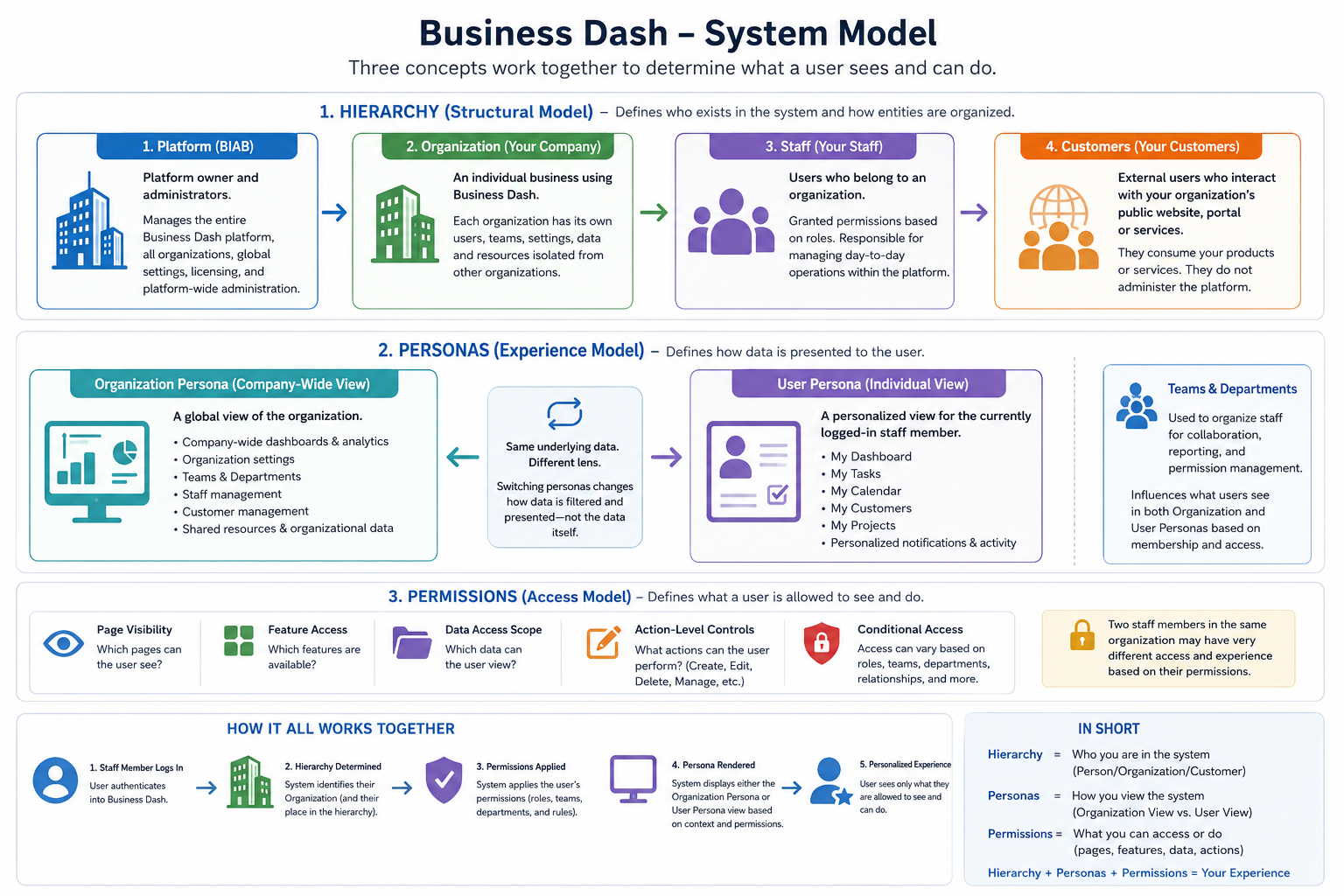
1. Hierarchy (Structural Model)
Hierarchy defines who exists in the system and how entities are organized.
Business Dash is a multi-tenant application, meaning a single platform can host and manage multiple independent organizations while keeping each organization's data isolated and secure.
-
Platform (BusinessDash) — The application owner and platform administrator. This level manages the entire Business Dash platform, including all organizations, global settings, licensing, and platform-wide administration.
-
Organization (Your Company) — An individual business using Business Dash. Each organization has its own users, customers, settings, data, and resources that are isolated from every other organization on the platform.
-
Staff (Your Employees or Team Members) — Users who belong to an organization. Staff members are granted permissions based on their assigned roles and are responsible for managing the organization's day-to-day operations within the platform.
-
Customers (Your Customers) — External users who interact with your organization's public-facing website, portal, or services. Customers do not administer the platform or organization; they primarily consume the products or services offered by the organization.
This layer answers: "What level of the system am I dealing with?" It is primarily concerned with ownership and structural relationships.
Throughout the documentation, references to Platform, Organization, Staff, and Customers should be interpreted according to these definitions.
2. Personas (Experience Model)
Personas define how data is presented to the user.
- Organization Persona — A global, company-wide operational view
- User Persona — A personalized, role-aware workspace for an individual staff member
This layer answers: "How is the system being viewed right now?"
Personas do not change the underlying data — they change the lens through which it is displayed. See the Personas page for a full explanation.
3. Permissions (Access Model)
Permissions define what a user is allowed to see and do within the system.
- Page visibility
- Feature access
- Data access scope
- Action-level controls (create, edit, delete, manage)
This layer answers: "What can this user actually access or modify?"
Permissions are evaluated on top of both the Hierarchy and Persona layers, meaning two users in the same organization may experience very different interfaces. See the Permissions & Access Control page for the full model, including teams, departments, roles, and permission scopes.
How These Layers Work Together
Business Dash operates by combining all three models:
- Hierarchy defines the structure of the system
- Personas define the viewing context
- Permissions define the allowed interactions
In practice:
A staff member logs in → the system determines their organization (Hierarchy) → applies their permissions → and renders either the Organization or User Persona view based on context.
This separation ensures Business Dash remains scalable, secure, and flexible across multiple organizations and user roles.